Scrubber Valve
To access the scrubber valve settings:
- Enter the Injection Pump system via the main screen (Image 1.1).
- Once in the injection system, click on "Scrubber Valve" (Image 1.2).
This will bring up the scrubber valve configuration, allowing you to set up and manage its operation in conjunction with the injection pump for enhanced cleaning of the system.
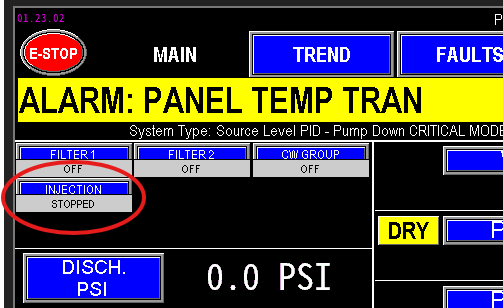 1.1 Injection Pump |
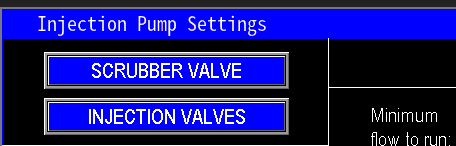 1.2 Scrubber Valve |
Scrubber Valve Settings
Within the scrubber valve configuration (image 1.3), you can adjust automation parameters that optimize its operation. These settings enable the PLC to control the timing, duration, and sequence of the scrubber's cleaning cycle, ensuring effective system maintenance and integrating the scrubber function with overall station automation.
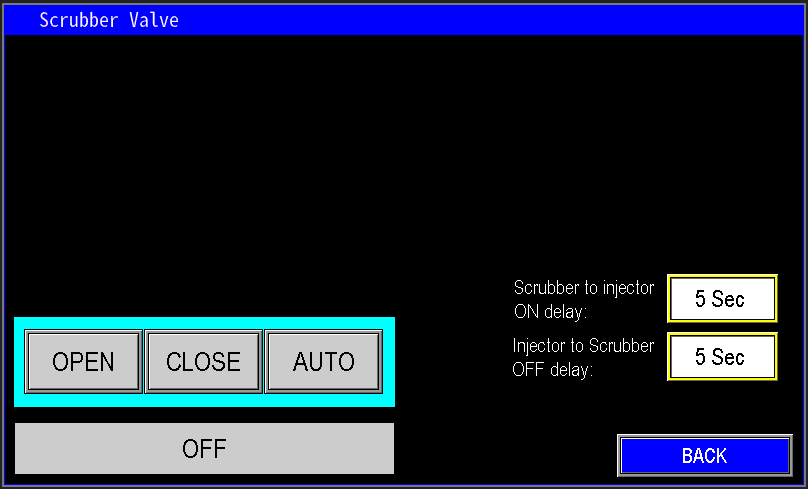
1.3 Scrubber Valve Settings
Virtual Operator and Status
The virtual operator functions similarly to other system controls (image 1.4):
- "Open": Engages the signal to open the scrubber valve. It will stay open until manually closed or switched back to auto mode.
- "Close": Engages the signal to close the valve. It remains closed until manually opened or set to auto mode.
- "Auto": Allows the PLC’s automation logic to control the valve according to scheduled cycles or operational conditions.
Below these controls, the current operational status of the valve is displayed, indicating whether it is OFF/Closed, ON/Open, in AUTO mode, or IDLE, providing clear real-time status feedback.
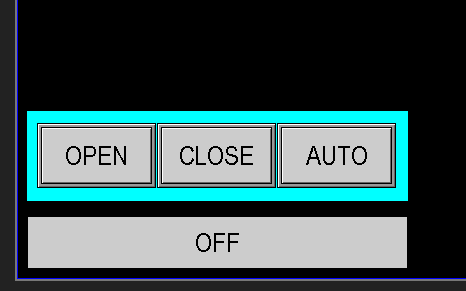
1.4 Virtual Operator
Valve On and Off Delays
The delay settings for the scrubber valves operate similarly to those of the injection valves but in reverse (image 1.5):
"Scrubber to Injector ON Delay":
This timer controls how long the scrubber valve remains open before the injector pump is turned on. After the specified delay, the injector pump activates to assist with cleaning.
"Injector to Scrubber OFF Delay":
Once the cleaning cycle is complete, the injector pump is turned off, then this delay timer counts down before closing the scrubber valve. This ensures the system is properly flushed and prevents abrupt shutoffs.
These delays help coordinate the scrubber and injector pump operation for effective cleaning cycles.
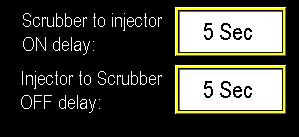
1.5 On/Off