Fill Valve
A fill valve is a discharge valve used to divert water from the pump station to fill a reservoir—such as a pond, sump, or tank—on demand. Flow from the discharge to the Fill Valve can be monitored via the Fill Flow Meter.
Fill Valve Settings
Navigate the the fill valve settings via the main screen, or the menu screen (Image 1.1).

1.1 Fill Valve Settings
Fill Valve Data
This display shows runtime data for the fill valve: total hours operated and the date the hours were last reset. Pressing Reset Hours clears the runtime counter to zero and updates the "since" date to the current HMI date (image 1.2).

1.2 Run Data
Status Settings
The bottom of the screen (image 1.3) shows the command to the valve via the virtual TOA (Test, Off, and Auto).
It also displays the Cut-in and Cut-Out Settings
- Cut-in: The level at which the fill valve will turn on (open) and begin filling the destination
- Cut-out: Once the level reaches the heigh of the cut-out level at the destination, the valve will turn off (close)
The valve will only follow Cut-in and out settings when the TOA is in Auto.
The status displays what state the valve is in, OFF, IDLE, or OPEN.

1.3 Pump Settings
Configuration
The Fill Valve configuration screen (image 1.4) displays the purpose of the fill valve (image 1.5), and allows for us to put a specific name to the valve if desired to display on the fill valve settings screen (image 1.6 & 7).
 1.4 Configuration |
 1.5 Level to fill |
| --- | --- |
 1.6 Distinguished Name |
 1.7 Name |
Fill Devices
Fill Device Assignment (image 1.8)
If configured using the ITS system setup, the fill devices could be grouped together like image.
When the station includes one or more fill devices, assign each device as either Source or Destination in the configuration. This assignment adds a clear label in the fill device settings indicating which tank, pond, or source each fill device serves (image 1.9).
For more information on ITS navigate to the Admin Settings (password protected).
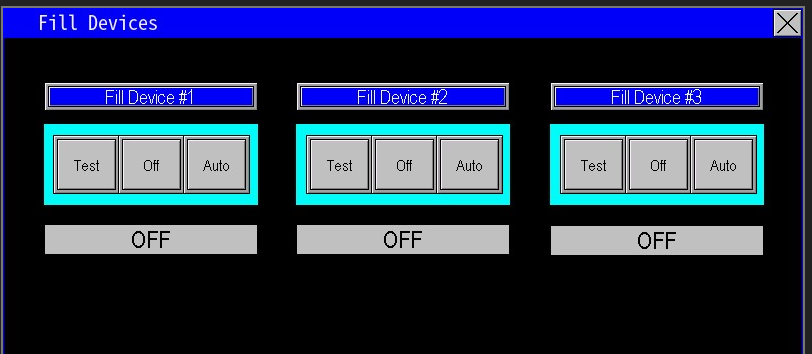 1.8 Fill Device Assignment |
 1.9 Fill Device |